Browse the Network: 9rules / Apple Gazette / Blog Herald / Daily Bits / Forever Geek / Performancing
infographiclabs.com


Custom Search

Twitter Tweaks its Homepage a Bit

homepage screen 490x311 Twitter Tweaks its Homepage a Bit

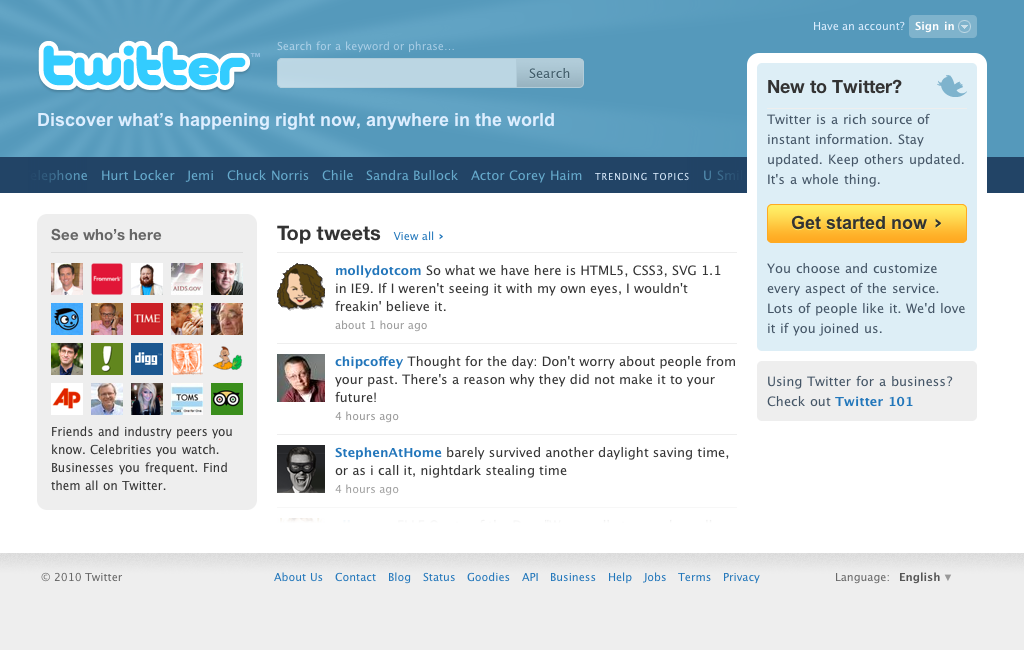
In case you’re visiting Twitter.com right now and you happen to be not signed in to your account, don’t be surprise to see a different Twitter.com homepage (see image above).  Twitter has just rolled a new interface design for its homepage, this is the main page that you see when you’re not logged in to Twitter.com.

Actually in terms of look and feel the new Twitter.com homepage is not really that different from the old design.  The large blue banner on top of the page is still there, although some phrases and branding statement where tweaked a bit.

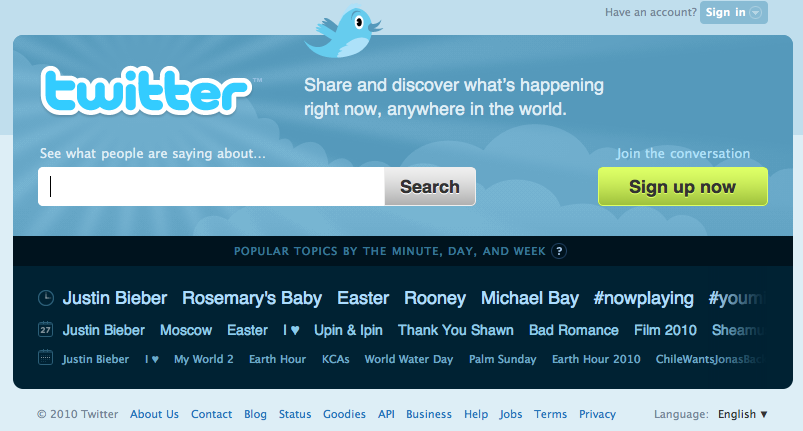
Here’s  the old Twitter.com:

Screen shot 2010 03 31 at 4.56.29 AM 490x263 Twitter Tweaks its Homepage a Bit

If you’re a keen observer, the first thing that you notice is the change in the Twitter tagline – from “Share and discover what’s happening right now, anywhere in the world” to “What’s happening anywhere in the world, right now.” Obviously the word “share” was omitted. The Twitter blog didn’t directly give an explanation, although a line in the post announcing this change might have suggested the reason for deleting “share” from the tagline.

All of our recent changes embrace the notion that Twitter is not just for status updates anymore. It’s a network where information is exchanged and consumed at a rapid clip every second of the day. With so much being shared, we know that there’s something of value for everyone. People who internalize the value of Twitter understand the power of this simple medium. But it hasn’t been easy to make that value transparent or obvious for curious folks coming to Twitter for the first time.

In other words, Twitter is trying to underscore the “sharing” aspect of Twitter and highlights the fact that Twitter is now a place were discussions among Twitter members are held, what people are tweeting about, and who are the Twitter members who just visited Twitter.com.

So below the huge blue-themed banner on top, you’d see dynamic content highlighting the top tweets at Twitter right now as well as some famous Twitter members.

Generally, Twitter wants to give first time Twitter.com visitors some compelling reasons to sign up for Twitter while maintaining interests among current members.

Google Turns its Bookmarking Service into a Collaborative Tool

bookmarkslist 300x90 Google Turns its Bookmarking Service into a Collaborative Tool

To be honest about it I forgot all about Google Bookmarks since the first time I encountered it. And that was a long time ago. For awhile I thought it ceased to exist since Google was not really active in promoting it. Until now, as Google just announced a new of Google Bookmarks – List.

In case you’re not aware, Google Bookmarks lets you save shortcuts to your favorite webpages and navigate to them easily and quickly. Google Bookmarks are similar to your usual bookmarking facility, desktop or browser except for the fact that items you bookmark are not saved on your computer but on your Google account instead.

Previously, Google Bookmarks allow you to organize your items by categories.  Now, the new feature lets you organize your bookmark items by lists.  Google Bookmarks lists are easy to manage and update but more importantly can be shared to others.  Even better is the fact that your friends and contacts can add items to your shared lists as well. Hence, making Google Bookmarks an online collaboration tool.

In addition, you can also view videos and other content such as reviews, maps and more on your list.

List is currently an experimental feature of Google Bookmarks. To try it out, simply visit  Google Bookmarks on google.com.

Digg Launches Buttons and Widget Generator

Screen shot 2010 03 24 at 4.55.12 AM 490x178 Digg Launches Buttons and Widget Generator

Digg has just launched its new buttons and widget generator tool for publishers to easily integrate Digg on their blogs and websites.  These newly improved smart Digg buttons and widget generator were launched this early to prepare publishers for the upcoming launch of the newly redesigned Digg.

While some publishers have previously integrated Digg in their websites well, the previous process however required customization work through the Digg API. The new button and widget generator can easily help you integrate as well as blend the Digg buttons and widget to your websites.

Now for some new features of the Digg button that you are about to create:

  • Buttons no longer take users to Digg, traffic stays on the publisher’s domain
  • Dynamic display of live Digg count – statistics have shown this increases likelihood of user interaction
  • Faster load time
  • Customizable look and feel – includes a new “medium” button size and an unstyled option so a publisher can create their own custom designed Digg button
  • Related stories from the publisher’s domain to users that click the button
  • All existing smart Digg buttons will auto-upgrade in the coming weeks – however, it is recommended that publishers review the new documentation for optimization tips

While Digg widgets also get the following new features:

  • Headlines now link directly to the publisher’s content with the Diggbar instead of the Digg permalink page
  • Customizable – more customization options without requiring publishers to use the Digg API
  • Tabs & columns – ability to add multiple tabs to a widget as well as make a double column widget
  • Thumbnails – by default a thumbnail is attached to each story when available
  • Fallback content logic by domain – if there is insufficient content to display, the widget has logic to backfill with relevant content from the same domain

Ready to create your Digg buttons and widgets, check this and this.

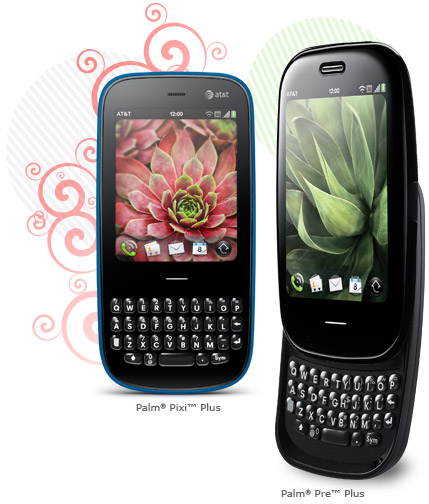
Palm’s Dynamic Duo, Pre Plus and Pixi Plus Go to AT&T

palmpixipluspalmpreplus 255x300 Palms Dynamic Duo, Pre Plus and Pixi Plus Go to AT&T

Knowing the lackluster performance of Palm’s dynamic duo, the Palm Pre Plus and Palm Pixi Plus did not discourage AT&T from getting the two smartphones. AT&T just announced that it will be releasing the Pre Plus and Pixi Plus with all the goodness of WebOS under its various data plans.

And are these data plans enticing enough to convince you in getting one if not both of these phones? Let’s see.  AT&T is offering the Pre Plus and Pixi Plus for just $149.99 with $49.99 discount and a $100 mail-in rebate if you opted for a two-year contract.  You will also get AT&T Wi-Fi access at U.S. hotspots as part of their unlimited data plan.

Both Pre Plus and Pixi Plus will support AT&T services such as AT&T Navigator, AT&T Address Book, YPMobile for finding local businesses. And of course, you’d also get to enjoy the specs and features of both Pre Plus and Pixi Plus smartphones running on Palm webOS.  Among these features as multitasking on apps, Palm Synergy, unobtrusive notifications, and universal search.

In addition, Palm webOS apps can be integrated into core webOS functionalities includng contacts, layered calendars, notifications and GPS. You might as well add the rich catalog of apps available at the Palm webOS applications store.

So, what will it be? Palm Pre Plus and Palm Pixi Plus on AT&T or Google Nexus One?

Avoid the Mad Rush! Submit your iPad Apps Now

Screen shot 2010 03 20 at 5.57.10 AM 490x296 Avoid the Mad Rush! Submit your iPad Apps Now

Come April 3, there will definitely be an influx of iPad applications trying to gain exposure on the iPad App Store.  So, if you are a developer and you want your apps to be among the iPad launch apps, you better start finalizing these apps now and submit it to Apple for approval. You only have until March 27 to ensure that your apps will be featured during the iPad launch on April 3, say Apple.

Apple has issued the following guidelines to help you with your plans of submitting your iPad applications:

  • Build and test your iPad application using iPhone SDK 3.2 beta 5 available on the iPhone Dev Center. Only iPad apps built with SDK 3.2 beta 5 will be accepted for this initial review.
  • Upload your distribution signed app through iTunes Connect by Saturday March 27, 5pm PDT.
  • The App Review Team will review your app on iPad and email you details about the readiness of your app.
  • You wil also receive additional information about submitting your app for final review before iPad ships.
  • Only apps submitted for the initial  review will be considered for the grand opening of the iPad App Store.

So there. You’ve got a whole week to prepare your applications and submit them to Apple for review. Since the it will only be a fews before the iPad App launch there’s a pretty big chance that your application will make it on time. I mean common, can Apple really review all the apps that will be submitted on March 27 thoroughly?

Google’s Bundle of Goodies for Android Phones, Orkut and Buzz Widget

Screen shot 2010 03 19 at 5.54.08 AM Googles Bundle of Goodies for Android Phones, Orkut and Buzz Widget

Google has just released two new applications for all Android devices – Orkut and Google Buzz Mobile as a a widget.  Interestingly, while Orkut  may only be popular among in Brazil and India, this won’t stop Google from giving the site its own Android application. Besides there are probably thousands of Android phones in those two countries. Or perhaps with an Android app, Google hopes to get new members for Orkut.

The Orkut Android app is a pretty simple mobile social networking app which lets you keep in touch with your Orkut friends through live folders, photo uploads and scrap notification.

vidya 180x300 Googles Bundle of Goodies for Android Phones, Orkut and Buzz WidgetLive Folders lets you add the list of your Orkut friends as a live folder on your home screen letting you browse through the list even when your not under data network coverage.  The app also lets you directly upload photos from your Android gallery to your Orkut photo gallery. In addition, the Orkut Android app also lets you receive notifications whenever you have new scraps on Orkut. This notification appears on your Android device notification bar and clicking on it will take you to your scrapbook page in Orkut.

The other application is Google Buzz for Mobile which was made available fairly recently. But for this update, you can now add Google Buzz as a widget on your Android phone’s homescreen.  As a widget, Google Buzz lets you choose to tag your posts with the lcoation or place from which it was posted. It also lets you post buzz anytime, anywhere as well as share photos of where you are right now.

If you haven’t installed Google Buzz for Mobile yet on your Android phone, now is the right time to do so. Search for “Google Buzz” from the Android market. Once installed, you can add it to your phone’s homescreen by simply tapping on “Menu”  and select “Add > Widgets > Google Buzz”

Stargazing with Bing Maps’ World Wide Telescope App

Screen shot 2010 03 18 at 4.44.20 AM 490x219 Stargazing with Bing Maps  World Wide Telescope App

Have you often looked up to the sky at night and keeps on wondering what could be out there in the vast universe? Have you ever wished that you can check the sparkling stars and name each and everyone of them without using a high-powered telescope in some laboratory? Well, now you can, right smack on your computer screen. Thanks for Bing Maps and the World Wide Telescope (WWT)  application.

The WWT application lets you explore the constellations and other known space objects similar to how you navigate through a regular Bing Map. It utilizes Microsoft Silverlight client right in Bing Maps and provides real time information about how the space is moving over the Earth. If you’ve been using Bing Maps before you’d pretty much have an idea how to go through the WWT application and navigate your way through the virtua stars and constellation unfolding right in front of you.

Now, here’s the coolest part. When you’ve selected a particular spot, you can click on it and the WWT application will shift to Bing Maps Street View. Giving you the sweet spot on earth where you should have been if you were actually looking at the sky using a real telescope. Sweet, right? This feature was demonstrated at the last TED event actually.

Want to go stargazing tonight? Check out the Bing Maps World Wide Telescope app. Make sure that you have Microsoft Silverlight installed on your computer to make the app work.

BlackBerry Gets the Merriam-Webster’s Dictionary Apps

Screen shot 2010 03 15 at 10.55.22 PM 490x254 BlackBerry Gets the Merriam Websters Dictionary Apps

How about this folks? Imagine a printed version of Merriam-Webster’s Unabridged weighing around 12.5 pounds. But thanks to data compression and digital technology, that bulky dictionary can now be housed, accessed and used on a 25MB space in your mobile phone. To be specific about it – the Merriam-Webster’s Unabridged Dictionary on your BlackBerry phones.

Wait, but that’s not all that you can have on your BlackBerry device, but the whole Merriam-Webster dictionary lines via a mobile application developed by Paragon Software Group of California. The Merriam-Webster Dictionary app supports  all BlackBerry Smartphones with OS version 4.2.1 and higher, except the BlackBerry Storm.

The application features – online update or over-the-air program updates, dictionary database installable on flash cards, hyperlinks between related articles and directions, search history, online dictionary catalog that provides one-click access to other Merriam-Webster Dictonaries, multilingual interface and no internet connection required.

But before you check out the BlackBerry App World to download the app, be prepared to spend some extra dough since this apps are not for free. The complete line of Merriam-Webster’s Dictionary and their selling price are as follow:

  • Merriam-Webster’s Collegiate Dictionary, Eleventh Edition ($24.95)
  • Webster’s Third New International Dictionary, Unabridged ($59.95)
  • Merriam-Webster’s Medical Dictionary ($24.95)
  • Merriam-Webster’s Pocket Dictionary ($14.95)
  • The Merriam-Webster Dictionary ($19.95)
  • Merriam-Webster’s French-English Dictionary ($24.95)
  • Merriam-Webster’s Spanish-English Dictionary ($25.95)

If you see a need to have any of these Merriam-Webster Dictionary in your BlackBerry, go check out the app at http://www.penreader.com or at the BlackBerry App World.

First Lady Obama Seeks Apps for Healthy Kids, Are You Up for the Challenge?

First Lady Michelle Obama and the USDA has launched a competition for developers, game designers and students to develop the most fun and engaging tools and games that will encourage children, specifically “tweens” (ages 9-12) to eat better and be more physically healthy and active.

Apps for Healthy Kids aims to halt the increasing rate of obesity among children which have tripled in the past 30 years which may shorten the expect lifespan of chilren.

If you’re up for the challenge, the Apps for Healthy Kids  is requiring that any tools and games that you will develop be built based on USDA nutrition dataset which is available through the Open Government Initiative. These datasets provide information on total calories, calories from “extras” and MyPyramid food groups for over 1,000 commonly eaten foods.

So here’s how you can enter the contest:

During the competition submission period (March 10 – June 30, 2010), first register here (registration is free) and read the complete Official Rules and Questions and Answers. After you register you must verify your email address via the registration email sent to the email entered in the registration form. You will then be able to enter a submission. Fill out the submission form on the submit application tab, including your submission title, text description, link to game or tool, data set(s) used, and whether you are submitting in the “tool” or “game” category. A picture is optional but helpful. Be sure to read the terms and conditions, and if you agree, check off the box, and submit!

Finally, the prize, not much at $40,000 but hey, it’s for a good cause anyway.

Opera Mini 5 for Android Promises Faster Web Browsing, Almost Failed

operamininexusone 225x300 Opera Mini 5 for Android Promises Faster Web Browsing, Almost Failed

Opera has been pretty much around the news the past few weeks with one announcement after another.  In fact, we’ve covered several of  its headlines starting off with the release of Opera version 10 for Nokia smartphones, Opera Mini for Windows Mobile, and the release of Opera desktop browser version 10.

Now, here comes Opera with another major announcement – the release of Opera Mini 5 for Android phones. With this version of its mobile browser, Opera is bringing a fast and cost-efficient web experience to all Android phones. Of course if you’ve been an Opera user before you’d know that what makes it possible for Opera to deliver fast mobile web browsing is because of the fact that it compresses data by up to 90% before rendering them on mobile phones. More →