Somewhere along the way someone decided they like to dance and move their bodies, but they couldn’t be away from Facebook. After all, if you’re out doing some great you want everyone to know about it in your status. Pulling out your phone and typing in a status can be a drag. Wouldn’t it be nice if you could just move your body to update your Facebook status? Well you guessed it—a new technology known as the LikeBelt makes this possible. No, I’m not joking.
The belt was created by design and development company Deeplocal. The way it works is this: If you’re walking down the road and see something that you like and you want to Facebook “like” it, all you have to do is thrust your hips into the direction of what you like. This thrust will then register with your android smartphone and let all of your Facebook friends know what you “like” at the very moment you have decided you like it. You can see a photo of the LikeBelt taken from Deeplocal up above.
In an earlier article here in 901AM, we talked reported on survey results that more and more people are relying on the cameras on their phones in favor of point and shoots for taking photos on the fly. That report showed that current technologies are making the built in cameras on phones perform almost at par with stand-alone cameras. But Sony has announced a new technology that will still narrow that gap between built-in cameras and stand-alone cameras some more. More →
The company VMware, a leader in the virtual machine segment, has introduced new technologies allowing employees to use personal mobile devices for work. At the same time, the applications on these phones that are related to work will be controlled by means of a number of novel security settings. One example of one such state of the art device is Horizon Mobile, which the company introduced last week. This device can operate a virtual machine of a work Smartphone that is inside your personal phone. Other devices, thanks to which you can benefit from a work phone inside your personal one, include applications that can deliver a virtual desktop image to your desktop computer at work and applications that can deliver other work-related graphics and designs to your Smartphone or tablet. More →
Alright, to clear out confusion regarding the recent change in the delivery date of iPad pre-orders on the Apple Store, Apple made an official announcement stating that the iPad Wi-Fi +3G will ship on April 30 to those who pre-ordered earlier than this week. Likewise, it will also be available on Apple retail store at around 5:00 PM, on the same day that Apple starts shipping these iPads.
The confusion started yesterday, when Apple puts a May 7 shipping date for the iPad Wi-Fi+3G on the online Apple Store. Many thought that Apple moved the shipment date of the said iPad model to the said date. Â Many got worried and irritated perhaps because those who pre-ordered the said iPad earlier thought that their magical device will not be ship during the last week of April.
It turns out that the May 7 shipping date apply only to those who just placed their order this week, starting yesterday. Among those people is yours truly.
Aside from this, nothing much has changed from the previous pre-conditions relating to the release of the iPad Wi-Fi+3G model. Price-wise, it’s still $629 for 16GB, $729 for 32GB and $829 for 64GB. In line with the release of the 3G iPad, AT&T also announced that it will be offering a “breakthrough” 3G pre-paid data plans for iPad users.
Now, before you jump for joy since April 30 is just a few days away and start ordering your iPad in the hopes of getting it on April 30, well you’re in bad luck as the April 30 shipment does not apply to you. If you order the said iPad now from the Apple Store, the May 7 shipment day applies.
And if you’re not from the U.S., it might interest you to know that Apple will start accepting pre-orders for the iPad on May 10 in Australia,  Canada, France, Germany, Italy, Japan, Spain, Switzerland and the UK.  International pricing is yet to be announced.
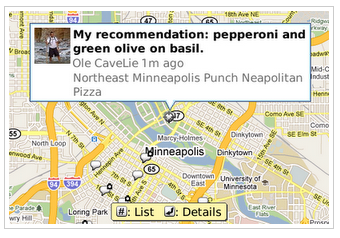
Google has just updated its Google Maps for BlackBerry app to version for. It’s a pretty big update if I may say so with some great features such as Google Buzz on Maps, voice search, location starring and more. Â It’s a pretty cool update, especially Google Buzz which I’ve been wanting to check out on my Nexus One phone but still couldn’t make it run.
Let’s go over to these new features of Google Maps 4.0 for BlackBerry. First off we have search by voice. Â The new feature lets you do your search by simply speaking out your search term. Just press the green “call” button, speak out and wait for your search results. As easy as that. The app lets you search for name of establishments, addresses or generic search terms. Search by voice support English and Mandarin Chinese.
Next Google Buzz for Mobile – a feature that I’ve been wanting to try in my other smartphones but failed to execute. Google Buzz for mobile on BlackBerry Maps 4.0 app lets you add the Google Buzz layer to see what’s going on around you as well as post to your Google Buzz account. You can share pictures, news and more. You can enable this feature by selecting Layers > Buzz and you’re good to go with your Google Buzz activities.
Another nice feature of  Google Maps for mobile 4.0 for BlackBerry device is personalized search suggestions. What the app does is to utilize your search history to suggest search terms for your new search. You need to enable web history on your Google account to use this feature on Maps for Mobile.
Once you’re signed in to your Google Account, the app will synchronize starred items between your maps.google.com on your computer and on your BlackBerry so much so that you’ll have the same starred locations on both interfaces.
Other new features of Google Maps 4.0 for BlackBerry include – Google Labs’ experimental features and viewing nearby businesses by choosing a point from the map.
To get Google Maps 4.0 for Mobile on your BlackBerry devices, simply point your phone’s browser to m.google.com/maps.
Suddenly, Amazon announced the availability of Kindle for Mac app. As if sending a signal to all Mac users planning to buy the iPad for e-book reading purpose that they can do the same thing with their current machine. Â That they don’t need to spend some precious $525 dollar just to have an e-book reader. Â They can do so with their existing machine and with the help of Amazon’s Kindle for Mac.
Now that I have let that issue out, let’s get into the details of the Kindle for Mac. Features? Pretty much what the application can do with its other iteration – Kindle for PC, Kindle for iPhone, and Kindle for BlackBerry.
Some of these features will let you:
Purchase, download, and read hundreds of thousands of books available in the Kindle Store
Access their library of previously purchased Kindle books stored on Amazon’s servers for free
Choose from 10 different font sizes and adjust words per line
Add and automatically synchronize bookmarks and last page read
View notes and highlights marked on Kindle, Kindle DX, and Kindle for iPhone
Read books in full color including children’s books, cookbooks, travel books and textbooks
Amazon also promise to roll out some more features soon. These include – full text search and the ability to create and edit notes and highlights. Kindle for Mac is available as a free download requiring around 20MB of your Mac’s storage. It works for all Intel Mac models. Â Ready to take this app for a spin? Â Here’s the download link -Â www.amazon.com/kindleformac.
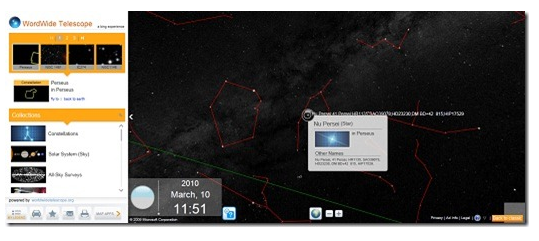
Have you often looked up to the sky at night and keeps on wondering what could be out there in the vast universe? Have you ever wished that you can check the sparkling stars and name each and everyone of them without using a high-powered telescope in some laboratory? Well, now you can, right smack on your computer screen. Thanks for Bing Maps and the World Wide Telescope (WWT) Â application.
The WWT application lets you explore the constellations and other known space objects similar to how you navigate through a regular Bing Map. It utilizes Microsoft Silverlight client right in Bing Maps and provides real time information about how the space is moving over the Earth. If you’ve been using Bing Maps before you’d pretty much have an idea how to go through the WWT application and navigate your way through the virtua stars and constellation unfolding right in front of you.
Now, here’s the coolest part. When you’ve selected a particular spot, you can click on it and the WWT application will shift to Bing Maps Street View. Giving you the sweet spot on earth where you should have been if you were actually looking at the sky using a real telescope. Sweet, right? This feature was demonstrated at the last TED event actually.
Want to go stargazing tonight? Check out the Bing Maps World Wide Telescope app. Make sure that you have Microsoft Silverlight installed on your computer to make the app work.
Whether we all like it or not, the Apple iPad has already marked its niche into the electronics industry. Despite the fact that it hasn’t even arrived on any user’s lap yet, the iPad, despite the many flaws and shortcomings thrown at it by critics is now becoming a benchmark for all other tablet PCs that are to be released by other manufacturers.
Take the case of Samsung which is reportedly preparing their own slate-like tablet PC. According to Philip Newton – Samsung Australia’s director of  IT Division, Samsung’s planned slate PC will boast of PC-grade processor and connectivity. It will be powerful enough that will drive users to make it as their primary computing devices. Incidentally, in case you’re not aware this is one feature that the iPad won’t probably achieved with any of its soon-to-be-released units.
Speaking at the Samsung Forum in Singapore, Mr. Newton even hits on the iPad saying that it lacks the processing power and connectivity features that slate-type platforms should have to spark interests among users. Â Mr. Newton even said that those Atom-powered devices even have more potential than the iPad has.
Is this a hint that the Samsung slate PC will be running on Android? Unfortunately, that remains to be seen, since details and information about the Samsung slate PC are not yet known.
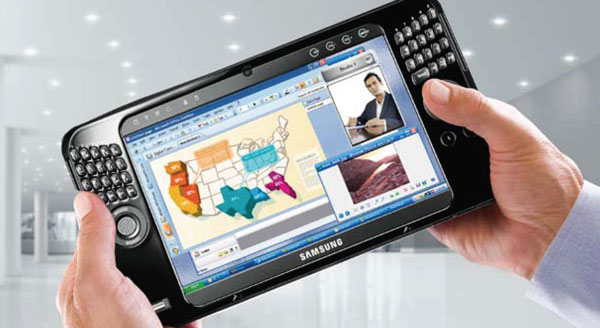
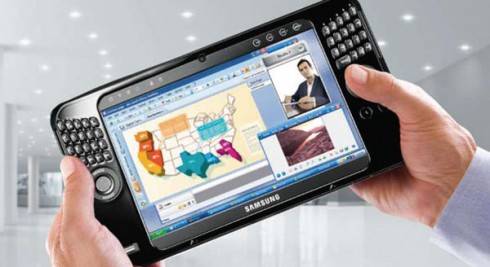
The good news is, we only have to wait until the second half of this year as Samsung promises to deliver the said device by then. In case you’re doubting Samsung’s capabilities to come with mini-computing device, just take a look at the picture above which is actually the Samsung Q1 UMPC Â released sometime in 2006. Â Unfortunately that UMPC didn’t reap much success for Samsung. But hey, who knows, with the interest on tablet-like devices today, Samsung might actually become successful with this one.
How about this folks? Imagine a printed version of Merriam-Webster’s Unabridged weighing around 12.5 pounds. But thanks to data compression and digital technology, that bulky dictionary can now be housed, accessed and used on a 25MB space in your mobile phone. To be specific about it – the Merriam-Webster’s Unabridged Dictionary on your BlackBerry phones.
Wait, but that’s not all that you can have on your BlackBerry device, but the whole Merriam-Webster dictionary lines via a mobile application developed by Paragon Software Group of California. The Merriam-Webster Dictionary app supports  all BlackBerry Smartphones with OS version 4.2.1 and higher, except the BlackBerry Storm.
The application features – online update or over-the-air program updates, dictionary database installable on flash cards, hyperlinks between related articles and directions, search history, online dictionary catalog that provides one-click access to other Merriam-Webster Dictonaries, multilingual interface and no internet connection required.
But before you check out the BlackBerry App World to download the app, be prepared to spend some extra dough since this apps are not for free. The complete line of Merriam-Webster’s Dictionary and their selling price are as follow:
First Lady Michelle Obama and the USDA has launched a competition for developers, game designers and students to develop the most fun and engaging tools and games that will encourage children, specifically “tweens” (ages 9-12) to eat better and be more physically healthy and active.
Apps for Healthy Kids aims to halt the increasing rate of obesity among children which have tripled in the past 30 years which may shorten the expect lifespan of chilren.
If you’re up for the challenge, the Apps for Healthy Kids  is requiring that any tools and games that you will develop be built based on USDA nutrition dataset which is available through the Open Government Initiative. These datasets provide information on total calories, calories from “extras” and MyPyramid food groups for over 1,000 commonly eaten foods.
So here’s how you can enter the contest:
During the competition submission period (March 10 – June 30, 2010), first register here (registration is free) and read the complete Official Rules and Questions and Answers. After you register you must verify your email address via the registration email sent to the email entered in the registration form. You will then be able to enter a submission. Fill out the submission form on the submit application tab, including your submission title, text description, link to game or tool, data set(s) used, and whether you are submitting in the “tool†or “game†category. A picture is optional but helpful. Be sure to read the terms and conditions, and if you agree, check off the box, and submit!
Finally, the prize, not much at $40,000 but hey, it’s for a good cause anyway.